Timesheet Builder for Jira
Data protection compliant time tracking
Timesheet Builder for Jira is the one and only solution to facilitate time tracking and team management as well as enable a permission system for work log access. Perfect for customers who need to hide work logs in order to comply with company policies.
Trusted by teams worldwide






Here's what Timesheet Builder for Jira can do
Hide worklogs from prying eyes
Jira work logs contain data on who worked on what task, when they worked on it and for how long. This kind of information can be considered sensitive, and yet there’s no way to make sure that only entitled people can access this information. Timesheet Builder finally closes this gap.
How to make Jira work logs confidential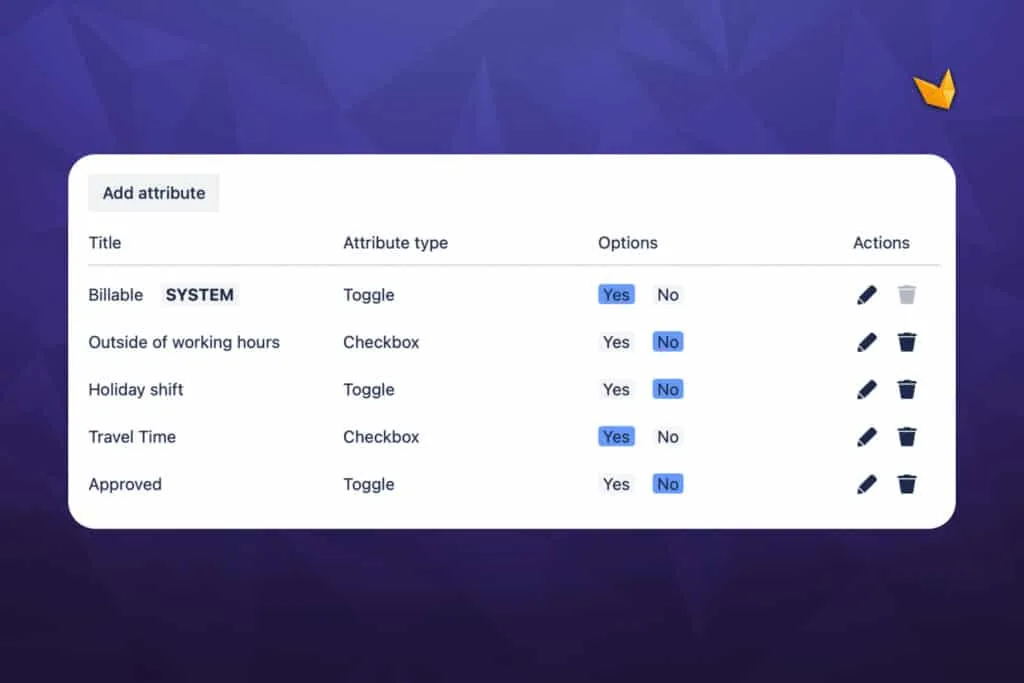
Attach attributes to worklogs
In Jira, all work logs seem the same. It is not possible to differentiate them and label them with arbitrary additional information, like ‘overtime’ or ‘billable’. Therefore there is no context as to what type of work log exists in any given ticket. With Timesheet Builder, this information can be attached directly to the work logs themselves.
How to add custom labels to Jira work logsExplore, learn, connect
Marketplace
Easy privacy-compliant Jira time tracker. Revolutionize your worklog creation, Timesheets, resource planning and teams managementProduct advice
Need help deciding which app solution would be perfect for your team? Want to clarify and compare app features with a real person?
Use cases

Stuff you probably want to know
Can I as a team lead see worklogs of my team mates?
Can I as a team lead see worklogs of my team mates?
Yes, to see your team members’ work logs in one view, you can set up a team and add your teammates with specific roles, calendars, and workloads. Once your team is created and set up, you can see the time booked for that team in the work log analysis view or get a high-level overview of time spent on the Overview page. Learn more with our team guide: Team lead Guide: Teams
Is it possible to mark worklogs as billable or non-billable?
Is it possible to mark worklogs as billable or non-billable?
Yes, if your team leader has added the work log attribute ‘Billable’, you will see a toggle next to the Time spent field. You can toggle between on and off to mark your work log as billable or non-billable. Learn more about managing worklog attributes: Worklogs subsection | Worklog attributes
Can I prevent my team mates from booking time to closed issues or to issues from another project?
Can I prevent my team mates from booking time to closed issues or to issues from another project?
Yes, as a team leader you can set the scope of projects and issues where your team members are allowed to add work logs. You can even select some specific issue statuses to prevent users from booking time for issues in these statuses. To limit the scope, please refer to our guide: How to set issue scope where team members can log time?
Is it possible to calculate spent time automatically?
Is it possible to calculate spent time automatically?
Yes, if you don’t want to manually calculate the time between the start time and the end time of your work, you can use the timer feature. The timer appears in an issue as a panel. All you need to do is click the play button when you start working on something. Once you are done, click the stop button. The time will be calculated automatically. Please read more about booking time using the timer feature: Track time with your timer in the issue view

Zhenya Elfimova, Product Owner
Let’s get this show on the road
Start working with Timesheet Builder for Jira today. Or book a personal demo and we’ll walk you through all the awesome things you can do with it.
Stay up-to-date with The Atlassian Detective
In our monthly newsletter, we solve mysteries related to the Atlassian toolset and developments in the ecosystem.