Summary
- Templates and automation help teams investigate IT incidents consistently and reduce administrative effort in the documentation process.
- You can create an incident postmortem template in Confluence, but how you use it is the bigger question. Ideally you want to automate document creation and data gathering from Jira.
- You can do this with Jira automation, but you need to be competent using automation rules and smart values and you may struggle to get your template to look exactly how you want it to.
- As an alternative, you can do your postmortem in a post-incident review ticket in Jira Service Management, using the template in the description field, and export it to Confluence. But this has different problems: there’s no template customizability, you’re forced to do the postmortem in Jira, and it’s only available to premium or enterprise users.
- AutoPage for Jira and Confluence is a way to fully automate the creation of postmortem pages with prepopulated Jira data and offers full template customizability.
The importance of templates and automation in incident postmortems
An incident postmortem template helps IT and engineering teams document incidents in a structured and consistent way. By using a standard format, teams investigate incidents correctly and thoroughly each time, and make postmortems easier to review and compare later.
However, one of the reasons teams struggle with incident postmortems is there isn’t enough automation. So it’s important to choose a process that reduces administrative effort, enabling your team to focus on the learning.
Atlassian offers some built-in postmortem templates across both Jira and Confluence and there’s also the option of creating your own. There are several different ways of generating and using these templates, and not all are made equal. Their effectiveness depends on the template type and the level of automation involved in creating and populating documents.
In this article, we’ll lay out the different templating options in Jira and Confluence so that you can decide which approach works best for your team.
What is an incident postmortem?
An incident postmortem, also known as a post-incident review, is a structured analysis of a disruptive event such as an outage or security breach. It’s designed to help teams understand why it happened and what can be learned from it.
It captures the details of the incident, identifies the underlying root causes, and outlines follow-up remediation actions intended to prevent similar incidents in the future.
Why you need an incident postmortem template
An incident postmortem is an investigation. All investigations should follow a clear, logical, objective structure that facilitates a team’s understanding of what happened, how it happened, and why.
Without that structure, an incident postmortem can become an oversimplified or overly technical account of what happened. There’s often a tendency to focus on a single trigger without sufficient regard to other contributing factors.
An incident postmortem template provides that structure. It ensures consistency and completeness and makes sure teams investigate incidents in the right way, examining the wider context and system, not just the technical symptoms. Templates encourage teams to document what was known at the time, what information was missing, and what assumptions were made.
This is one of the foundations of a blameless postmortem culture. Instead of identifying a person who failed, an incident postmortem template pushes teams to understand how the overall system allowed the incident to occur.
Postmortem templates have further benefits. They reduce cognitive load by acting as a guide to what should be documented and evaluated and in what order.
They also improve organizational learning. Inconsistently structured postmortems are difficult to study and compare. A template ensures a consistent format so that recurring patterns across incidents can be more easily identified.
What should an incident postmortem template contain?
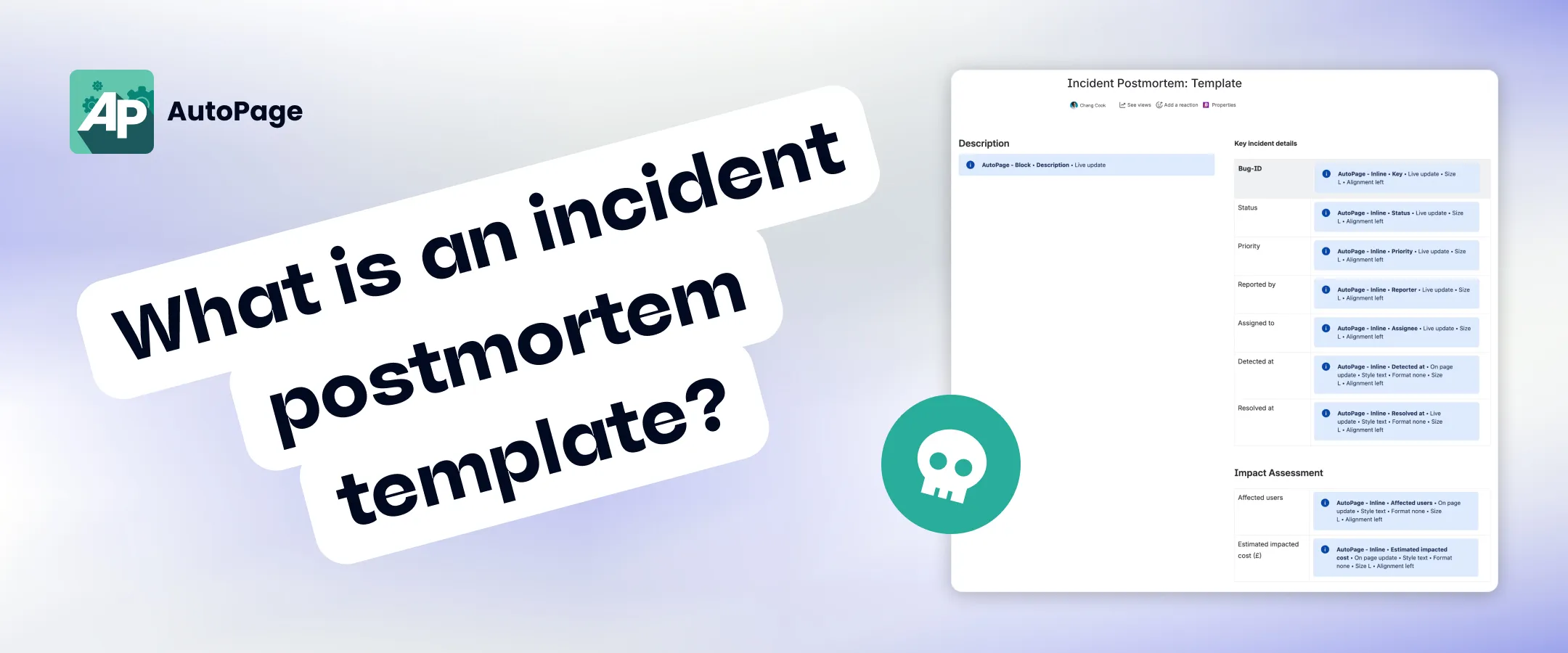
Ideally you want to have the following sections in your postmortem template:
- Incident details: core information like reporter, assignee, priority, impact and urgency ratings, resolution date, and fix version
- Timeline of events: a chronology of everything that happened with key actions, decisions, and timestamps
- Impact assessment: a summary of the incident’s business and technical impact including affected users, duration, and costs
- Root cause analysis: an examination of why the incident occurred, using a method like the “5 whys”
- Contributing factors: details of any systemic conditions that allowed the failure to occur or made it worse, such as process gaps, monitoring issues, or recent system changes
- Lessons learned: reflections on what went well, what didn’t, and what improvements can be made to the incident management process
- Follow-up tasks: a list of remediation tasks and process improvements
Does Atlassian offer an incident postmortem template?
Yes. In fact, they offer three.
The first two are Confluence page templates, and the third is a Jira Service Management (JSM) ticket template.
The first Confluence template is the ITSM post-incident review template. This was created by JSM.
The second is the incident postmortem template. This was created by Opsgenie (the incident management platform that has since been folded into JSM).
These templates cover much of the same ground: incident details, leadup, timeline, root causes, and follow-up tasks.
I’m not really sure why both exist, apart from the fact that one came from Opsgenie and one from JSM and Atlassian hasn’t thought to consolidate them.
The third template is part of the JSM post-incident review (PIR) work item type. In this flow, you create a work item for your postmortem and in the description field there is a template. It is similar to the Confluence templates and includes leadup, fault, root cause, lessons learned, etc. Then you draft your postmortem in the work item description and create a document afterwards by exporting it.
How to use an incident postmortem template in Jira and Confluence
There are several ways of deploying postmortem templates in Jira and Confluence. They vary in ease and effectiveness depending on the degree of automation, data integration, and template flexibility.
Manual approach
The default approach to using an incident postmortem template in Confluence is the manual one.
So you:
- create a new page
- browse the templates menu for either a built-in postmortem template or a custom one you’ve created
- select a template
- copy and paste information from Jira into the appropriate sections
There’s plenty of customizability here, because you can use whatever Confluence template you want. But there’s no automation. It means you have to spend a whole bunch of time doing tedious admin work before you even get to the analysis — the most important part of the postmortem.
Ideally, you want to automate the document creation and fact-gathering where possible.
Postmortems in Jira using PIR tickets
As an alternative to writing your incident postmortem in Confluence using a Confluence template, you can do it in Jira Service Management in a post-incident review ticket — and publish to Confluence later.
The post-incident review (PIR) is a work item type that pulls key incident details into the ticket. You then draft the postmortem analysis in the work item description, using the template in the field.
When you’re done, you can export the ticket to Confluence (as well as PDF, Word, or XML). The Confluence export automatically pulls the data and analysis from the PIR ticket and prepopulates the Confluence page inside a template.
There are a few limitations with the PIR ticket option:
- The postmortem itself happens in a Jira ticket. Jira isn’t practical or optimized for writing long-form documentation, which is why postmortems usually happen in Confluence.
- You can’t change the templates. Neither the description field template that guides the postmortem analysis, nor the Confluence template used for the export, can be customized.
- The export is a one-time sync. After export, changes made to the PIR ticket don’t automatically propagate to the Confluence page, which can cause version drift.
- The document itself has to be created manually, i.e. someone needs to hit the “Export” button and you can’t automate this.
- PIR work items are only available in JSM premium or enterprise plans, so for many companies this option is unavailable anyway.
Using Jira automation to generate Confluence postmortems
Jira automation allows you to fully automate the generation of an incident postmortem document in Confluence and pull Jira data into it.
However, your incident postmortem template has to be built in the “Page content” window in the automation rule. You can’t create a Confluence page the normal way, and tell the automation rule to use it as the template. As a result, you don’t get the full functionality of the Confluence page editor and it’s much more difficult to get your postmortem document to look the way you want it to.
You also need a good understanding of automation rules and smart values, and you typically need admin rights.
And just like the export option, the postmortem creation is a one-time sync, so when the work item gets updated, the page won’t.
Generating postmortems with custom templates using AutoPage
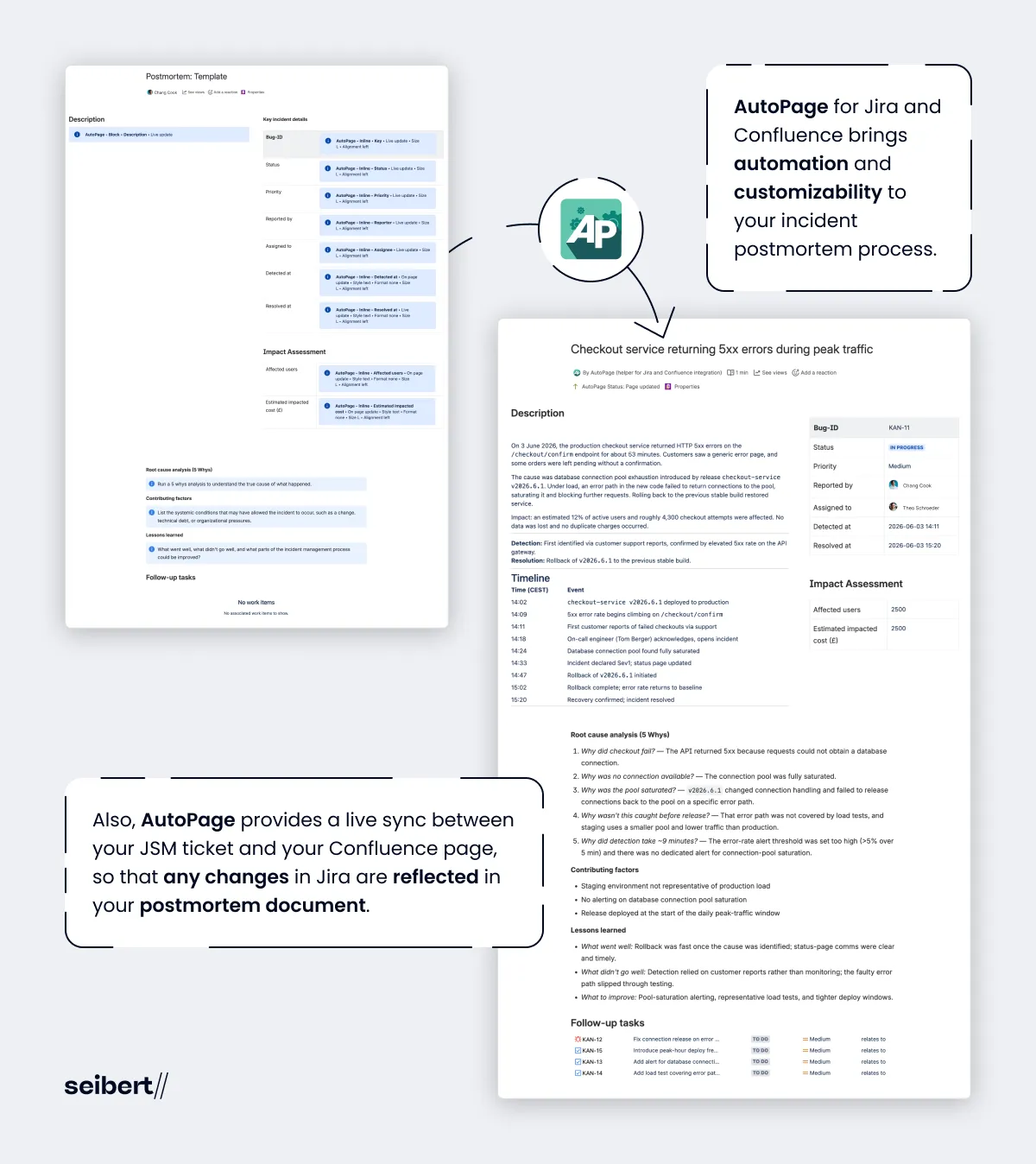
AutoPage for Jira and Confluence is an Atlassian Marketplace app that brings automation and customizability to your incident postmortem process.
In this flow, you create a normal page in Confluence to act as your custom postmortem template. Then you add AutoPage macros to it. These macros automatically pull Jira data into your postmortem document. So you can prepopulate your page with the incident summary, description, reporter, assignee, priority, resolution date, fix version, and a list of linked follow-up tasks.
Finally you configure AutoPage to automatically generate your prepopulated page in a designated space using system triggers, e.g. when an incident gets resolved.
With AutoPage, it’s much easier to create and use your own, fully customized incident postmortem template. You have complete flexibility over what the template should look like. You don’t have to mess around with smart values. And you get to do the analysis in Confluence, not Jira.
Also, AutoPage provides a live sync between your JSM ticket and your Confluence page, so that any changes in Jira are reflected in your postmortem document.
Creating an incident postmortem template in Confluence
If you use AutoPage for Jira and Confluence to generate incident postmortems from a custom template, the next question is, what should your template look like?
Here’s a list of the sections you could have, with some guidance on macros and placeholder text.
Confluence page title
Use a page title placeholder in your AutoPage rule that dynamically names your Confluence page, e.g. using the incident summary or issue key.
Key incident details
Use AutoPage inline macros to automatically pull the status, priority, reporter, assignee, detection date, resolution date, and any other fields you think offer essential context for the incident.
Description
Use an AutoPage rich text macro to insert the incident description, containing the timeline of events and resolution details.
Impact assessment
If you create custom number fields for your JSM incident tickets for things like Affected users and Estimated impacted cost (£) you can automatically pull these fields into Confluence using AutoPage inline macros.
Root cause analysis
Have some placeholder text similar to the native Confluence templates, e.g. “Run a 5 whys analysis to understand the true cause of what happened.”
Contributing factors
This is missing from the native Atlassian templates but absolutely should be included. Have placeholder text like: “List the systemic conditions that may have allowed the incident to occur, such as a change, technical debt, or organizational pressures.”
Lessons learned
Have placeholder text similar to the native templates: “What went well, what didn’t go well, and what parts of the incident management process could be improved?”
Follow-up tasks
Once you have created some Jira work items to prevent the incident from happening again, you can use the AutoPage linked issues macro to automatically pull them onto the Confluence page.
The upshot
If you create an incident postmortem template in Confluence, you want to use it as efficiently as possible, and not waste time copying and pasting Jira data into Confluence tables. That kind of administrative effort should be automated.
In Jira and Confluence, automation is possible. But you’re basically asked to trade speed for customizability or vice versa.
With AutoPage for Jira and Confluence, there is no trade-off. You get fully automated page creation, prepopulated with incident data from Jira, and full control over your incident postmortem template.
Want to try AutoPage free for 30 days?