Viable Issues
Better Jira issues from Confluence
Create Jira tickets from any Confluence page with ‘Create issue’ buttons. Preconfigure key fields so every ticket follows the same workflow—saving time and boosting clarity for meetings, projects, and teams on both Cloud and Data Center.
Trusted by teams worldwide







Here's what Viable Issues can do
Stop juggling fields and tabs. Viable Issues lets you place smart ‘Create Issue’ buttons on any Confluence page, so you can quickly create Jira tickets that follow your rules—and report back in real time.
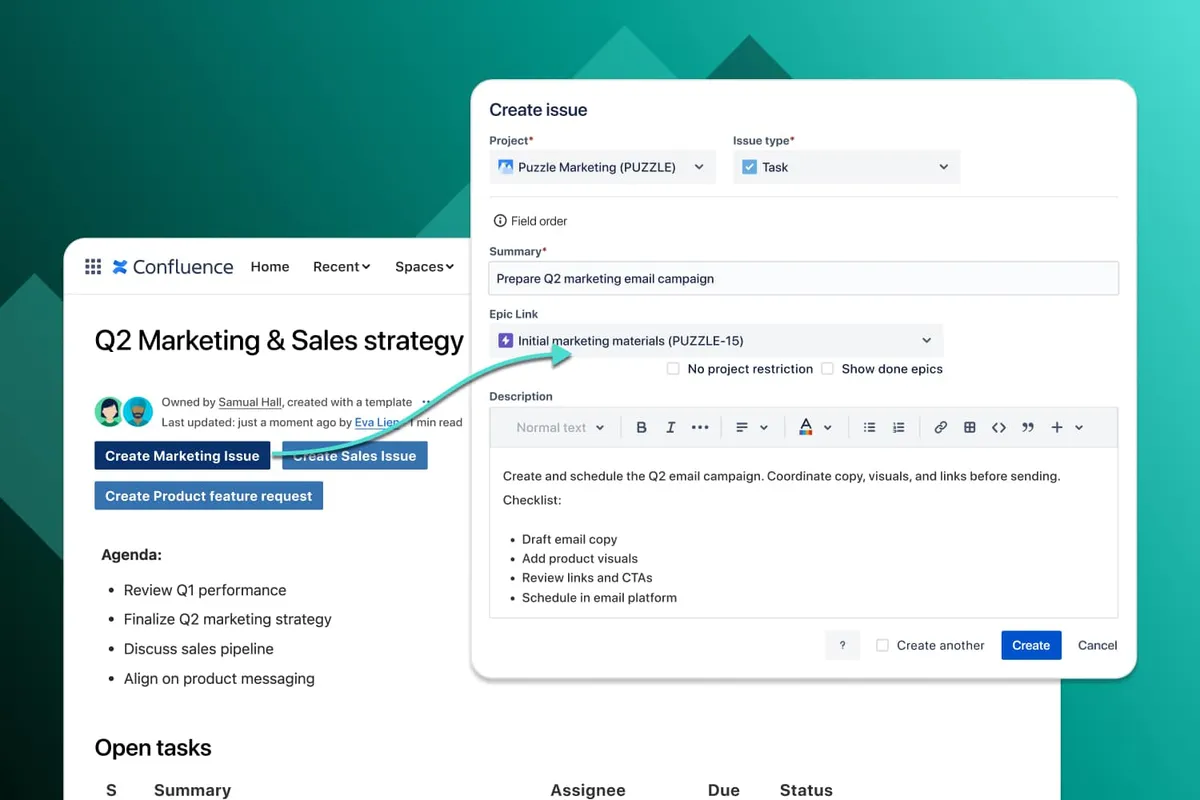
Fast, intuitive workflows
Create Jira issues right where your team plans and collaborates. Place customized “Create Issue” buttons in meeting templates, project pages, or anywhere in Confluence.
- Place "Create Issue" buttons anywhere on Confluence pages
- Customizable button labels match your workflow
- Works in both edit and live mode
- One-click access to ticket creation
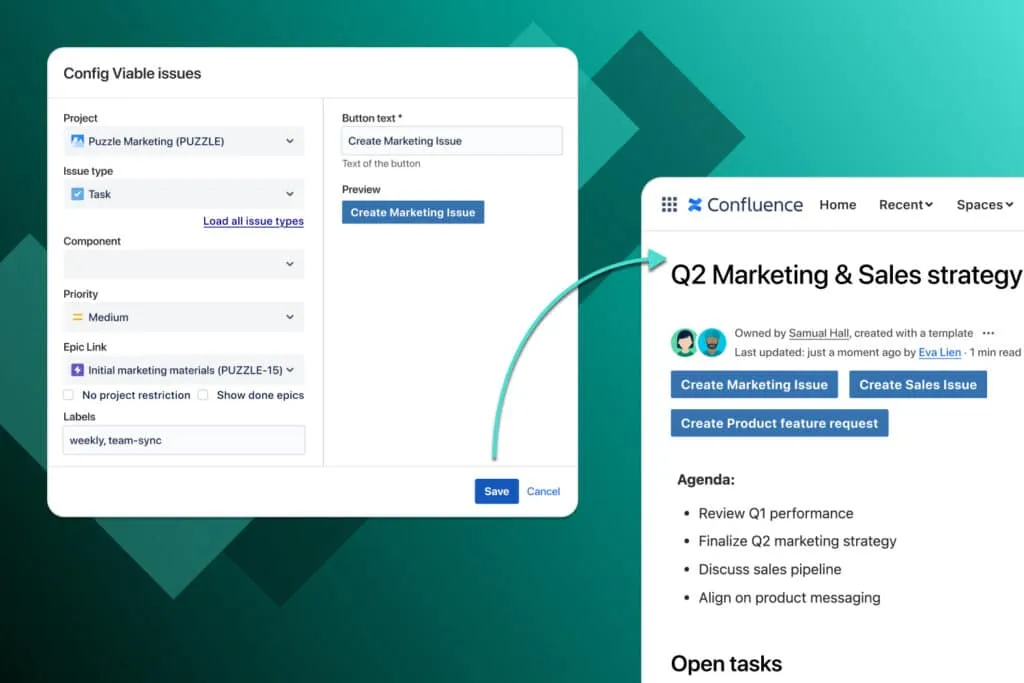
Preconfigured fields—consistent tickets by design
Predefined fields bring structure to issue creation. Set project, issue type and labels once, then use across templates so your team never wastes mental energy deciding what goes where. Result: more focus, less mistakes.
- Preconfigure essential fields (project, issue type, labels, etc.)
- Reuse button configurations across multiple pages
- Consistent field setup ensures proper routing
- Ideal for both simple and complex workflows
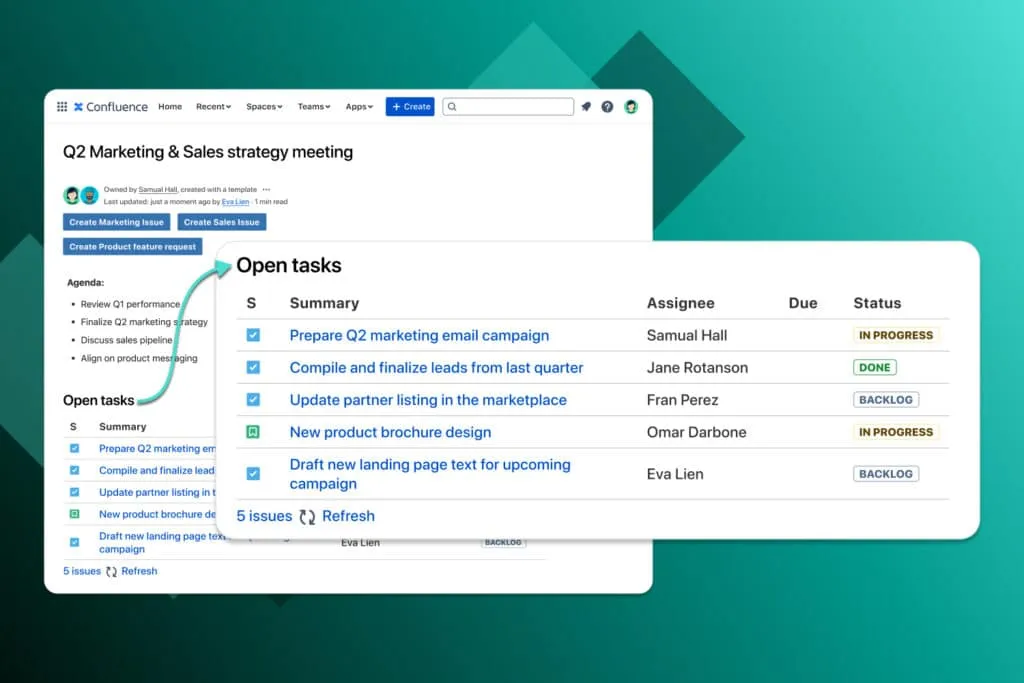
Integrated tracking & visibility
Easily see every Jira issue created from your Confluence page with the built-in page report. Keep track of progress without leaving your documentation or building complex Jira queries.
- Page-based report shows all issues created from that page
- View current status without leaving Confluence
- No JQL filters required to track related issues
- Automatic link back from Jira to source Confluence page
Explore, learn, connect
Marketplace
Automate Jira checklists for Definition of Done, Acceptance Criteria, ToDo lists, and more—smarter than Jira Action ItemsProduct advice
Need help deciding which app solution would be perfect for your team? Want to clarify and compare app features with a real person?
What customers think of
Viable Issues
Stuff you probably want to know
What does Viable Issues actually do?
What does Viable Issues actually do?
It lets you drop “Create Issue” buttons anywhere in Confluence. Each button carries your pre-set Jira fields (project, type, labels, etc.), so anyone can raise a fully-routed ticket in one click—without leaving the page. A built-in Page Report lists every issue created from that page and its live status, keeping planning and execution in one place.
How is Viable Issues different from Confluence's built-in "Create Jira issue"?
How is Viable Issues different from Confluence's built-in "Create Jira issue"?
| Edition | Confluence native | Viable Issues |
|---|---|---|
| Cloud | Quick but ad-hoc
| Preset, reusable & works in both modes
|
| Data Center | Basic macro — summary & description only
| Full field population unlocked
|
Which fields can we pre-set & who can edit a button?
Which fields can we pre-set & who can edit a button?
Currently the following fields can be pre-configured:
- Project
- Issue Type
- Labels
- Priority
- Component
- Epic Link
Anyone with space-admin or page-edit rights can place or modify a button. View-only users can still click it (as long as they also have Jira “Create Issue” permission). Coming soon: an option to restrict button editing to admins only.
On our road-map: Adding support for more fields including assignee, custom fields, and more, as well as field-locking so only admins can change a button’s settings.
How do we keep track of the issues we create from a page?
How do we keep track of the issues we create from a page?
Add the built-in Page Report macro. It lists every issue that originated from that page and shows live status—no JQL filters or hopping to Jira.
Does it work with Confluence templates?
Does it work with Confluence templates?
Viable Issues works anywhere in Confluence, including templates (e.g., meeting notes, project space, risk log). Every new page created from that template inherits the button’s field settings—giving you a repeatable workflow without extra setup.
Is it available on Data Center?
Is it available on Data Center?
Yes—the same Marketplace listing covers Cloud, Server and Data Center.
If you run Jira Server or DC you’ll also install the free Viable Issues Extension add-on. It enables the full field-population features described above.
Is my data secure and compliant?
Is my data secure and compliant?
All data stays inside your Atlassian site. Viable Issues stores its configuration in Confluence and writes tickets to Jira via Atlassian-approved APIs—no external servers or exports. See “Privacy & Security” on our Marketplace listing for details.
How much does Viable Issues cost?
How much does Viable Issues cost?
Pricing for Viable Issues is based on the number of users in your Confluence instance. To get an estimation, check out the pricing tab on the Marketplace.
You get a 30-day free trial for Cloud and an evaluation licence for Server/Data Center, both available directly through the Atlassian Marketplace.

Florian Schneider, Product Owner
Let’s get this show on the road
Start working with Viable Issues today. Or book a personal demo and we’ll walk you through all the awesome things you can do with it.
Stay up-to-date with The Atlassian Detective
In our monthly newsletter, we solve mysteries related to the Atlassian toolset and developments in the ecosystem.