
I don’t know about you, but few things drive me crazier than an unlabeled fuse box.
Let’s say you’ve just moved into a new apartment. The kitchen lights go out, so you open the fuse box and find a neat row of identical switches. Not one of them has a label. The previous tenant knew exactly which switch did what. They just never wrote it down. So you start flipping at random, and suddenly the fridge is off, the Wi-Fi’s dead, and the kitchen is still dark.
Now swap the fuse box for a Jira board, and the previous tenant for the team that ran your project before you. Same problem. Everything you need to know was in someone’s head, and that head has left the building.
This article looks at how to fix that with a Jira setup that documents itself. No documentation sprints. No nagging. Just a system.
Every documentation system has two jobs
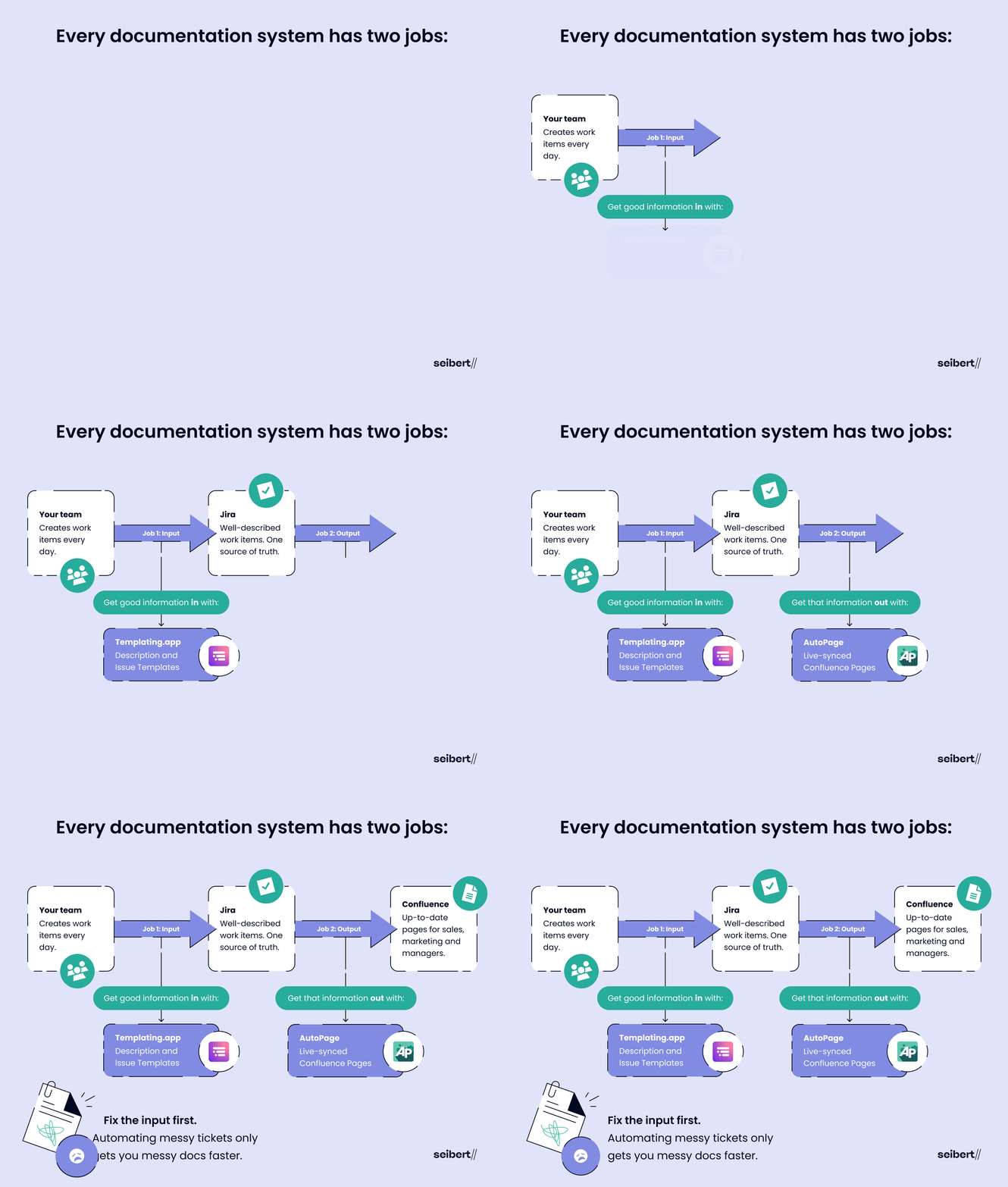
Here’s the thing most teams miss. A self-documenting system has exactly two jobs:
- Get good information in. Every work item needs to be described properly, by whoever creates it, every single time.
- Get that information out. It has to reach the people who need it, in a place they actually look, without anyone copying it over by hand.
Fail at the first job and you have an input problem. Fail at the second and you have an output problem. Most Jira setups manage to have both. (Impressive, really.)
And the order matters. Plenty of teams jump straight to job two: connect Jira to Confluence, generate some pages, done. But automating the output before you’ve fixed the input just gets you garbage in, garbage out, only faster. It’s like printing a beautiful set of labels for that fuse box without checking which switch does what. You’ll have labels. They’ll just be wrong.
So let’s look at both problems, then fix them in the right order.
The input problem: three ways bad tickets end up in Jira
The inheritance nightmare. Picture a product owner taking over a Marketplace app. He opens the Jira board that’s meant to help him run it and finds hundreds of tickets. Some have no description at all. Others just say “discussed in Slack.” (Which thread? From when? Good luck.) The old team had kept every bit of context to themselves, so when they moved on, the knowledge left with them. It cost the new team weeks of blind guesses, chasing the old team, and expensive rework. That’s your unlabeled fuse box.
Death by copy-paste. Endless user stories with the same boilerplate. 200 identical tasks every time a retail chain opens a new store. Zero people who enjoy typing them. Teams that create work items in bulk end up doing the same manual entry over and over, and the more often a human types the same thing, the more likely something slips.
“It doesn’t work. Help.” That’s every non-technical Jira user, every week. Bugs are often spotted by business stakeholders who’ve never heard of “steps to reproduce” and have no idea why an engineer cares which browser they’re using. So you get a one-liner, followed by a round of back-and-forth before anyone can fix a thing.
So can’t you just ask people to write better tickets, hoping they will?
You can. A few people will. Most won’t. And honestly, I don’t blame them. If a text box gives me no clue what to put in it, I’ll write the bare minimum and move on.
Hope isn’t a strategy. It isn’t a system either. And a system is exactly what you need.
The output problem: the people who never open Jira
Now for job two. Your developers live in Jira. A lot of the people waiting on their work never open it.
Think of a salesperson who’s just told a prospect about a shiny upcoming feature (hopefully without promising it for next Tuesday). They need to know where it stands. Product marketing needs release status to plan a launch. Managers want a quick update before a meeting. None of them are going to go digging through a dev team’s Jira space. They’ll ask around or, worse, go with whatever they last heard. But they do use Confluence.
That’s the output problem in a nutshell. The information exists. It’s just in the wrong place for half the company.
Job one: fix the input with templates and checklists
Surprisingly (or not), a self-documenting system starts with templates. They’re how you get well-described work items without relying on everyone’s good intentions. The catch? Jira still doesn’t give you proper ticket templates out of the box. (Thanks, Atlassian!) So Marketplace apps fill the gap.
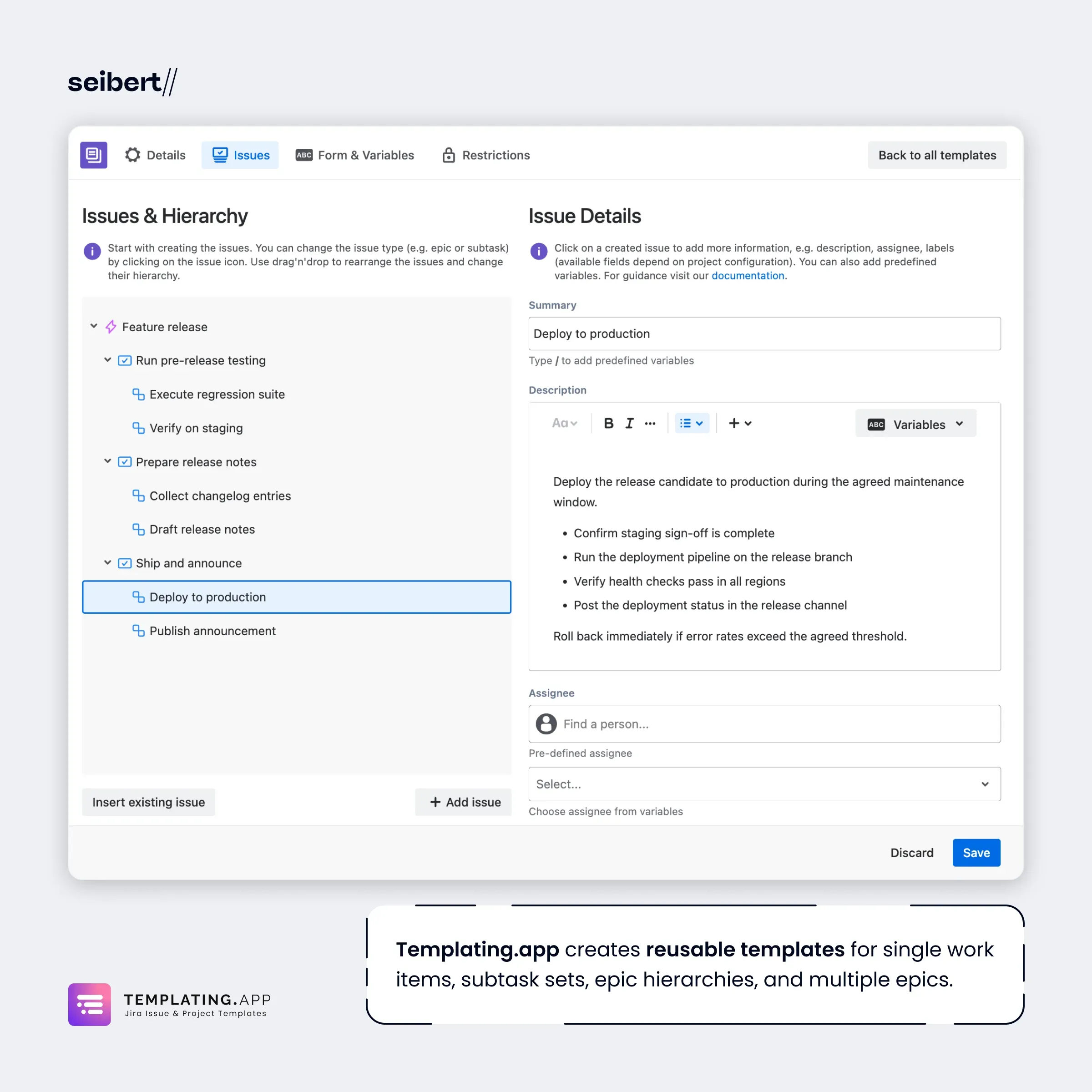
Templating.app is an all-in-one option, with templates for work items, descriptions, subtasks, checklists, boards, and spaces. Two of them do most of the heavy lifting here.
Description templates: actionable tickets on the first try
Description templates swap that blank, soul-crushing description field for guided structure.
Say someone from sales spots a bug. They create a work item, set the type to “Bug,” and a template pops up prompting them for steps to reproduce, expected vs. actual behavior, environment, and affected users. They can still write whatever they like. But they’re not staring at an empty box anymore, and your developers get something they can actually work with.
Want the full walkthrough? Here’s how to create a Jira bug report template.
Bug reports are the classic use case, but not the only one. Description templates can also set field values based on conditions, like who’s reporting the work item or which type they’ve picked. Want every bug your CEO reports to land with the priority already set to Highest? Done. Feature requests from the same CEO? Those can take their chances with everyone else’s. (Your call. We won’t tell.) Your Jira admin sets the rules up once, and they apply every time.
Issue templates: 200 work items in seconds
For bulk work, issue templates are the answer. (Jira calls issues “work items” these days, but the old name has stuck.) You build the structure once, subtasks and all, then tweak it whenever your process changes: swap work item types, add a task here, drop one there.
Three features make them really powerful:
- Dynamic values. Variables fill in whatever changes from batch to batch, like a client, product, or store name. You can also assign by role, so a bug fix goes to “junior developer” instead of a named person who might be on vacation.
- Automation triggers. Templates can kick in on their own via Jira automation, for example when a new space is created, a certain date arrives, or a new version is released. The work items just… appear.
- Permissions. You decide who can browse, edit, and apply your templates, right down to individual templates.
Remember that retail chain? Its 200 store-opening tasks now show up in seconds. And because they come from the same template, they look the same no matter who creates them. That consistency is worth even more than the time saved.
Checklists: make documentation part of “done”
Templates make sure a work item starts out complete. They can’t make sure it ends that way. A Definition of Done checklist can, especially if “Documentation updated” is on it.
Templating.app’s checklist templates add simple action items to the description, and for some teams that’s plenty. If you want to track progress, report on completion, and actually enforce the list, Didit Checklists for Jira is the better fit. Build the checklist once as a template, set it as the default for a work type, and it’s added whenever someone creates a work item of that type. A workflow validator then keeps the work item from moving to Done until the checklist is complete. Nobody hands over the keys until every switch in the fuse box has a label.
The bug reporting use case shows how a description template and a Didit checklist work together.
Input fixed. Pat yourself on the back.
User stories are another classic. Here’s how to build a Jira user story template so nobody has to retype that boilerplate ever again.
Job two: fix the output with live Confluence pages
With the input squared away, job two is getting all that good information in front of the non-Jira crowd, automatically.
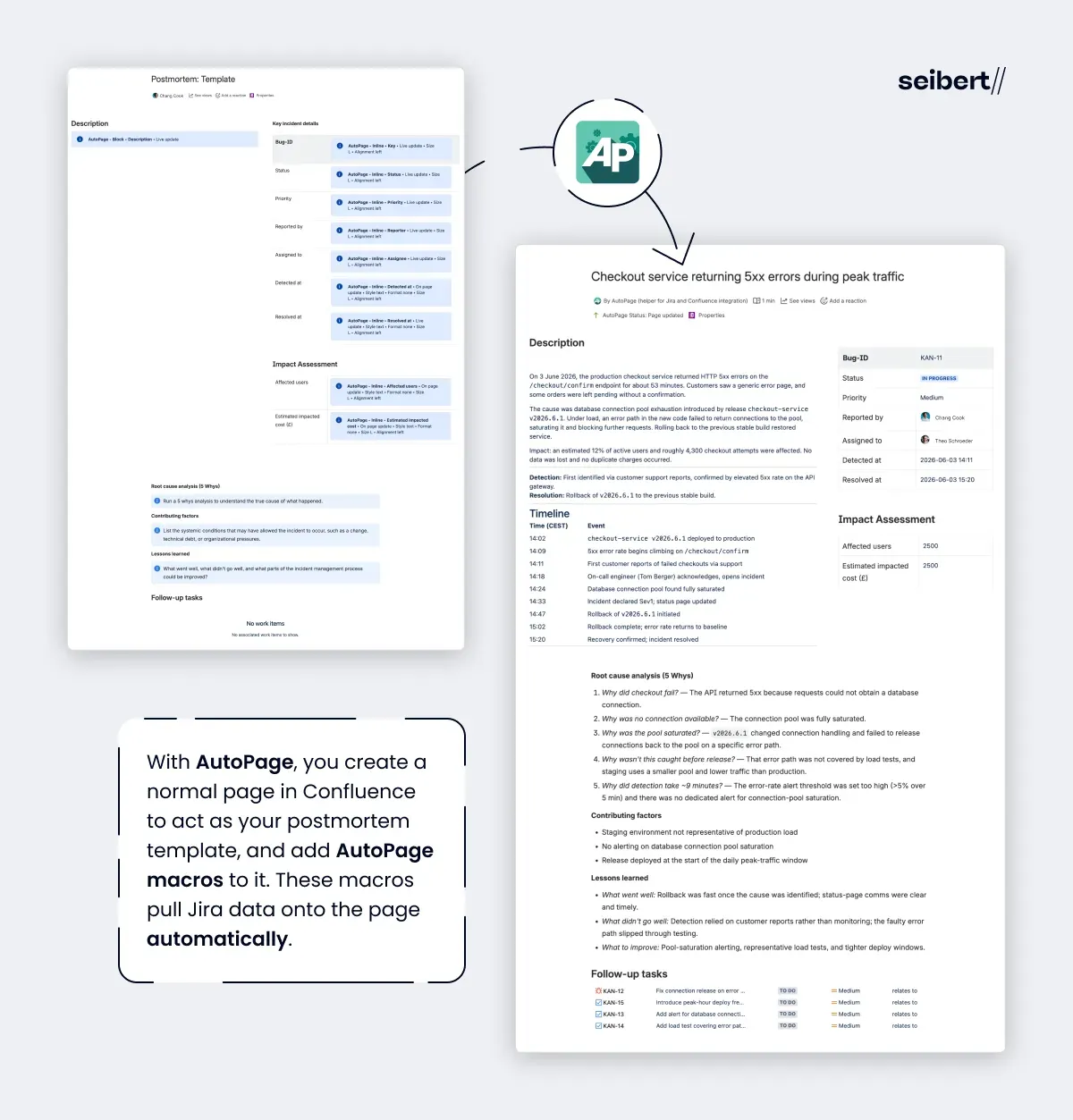
Remember that bug report from earlier? Here’s how it can end up documented in Confluence, right where the rest of the company can see it. And it’s not just bugs. The same setup works for change requests and incident management, too. If a release goes sideways anyway, even the postmortem page starts out with the Jira data already filled in.
AutoPage does this by creating a Confluence page for a Jira work item as soon as it’s created or updated. The page only shows the fields that matter, including attachments and comments, laid out cleanly and pulled in through AutoPage macros. And if your work items contain long and heated discussions, an AutoPage Rovo agent gives you a summary. With a bit of extra setup, AutoPage can even mirror your hierarchy: epics become parent pages, with their stories nested beneath them. Configuration happens once, in a rule that’ll feel familiar to anyone who’s built a Jira automation. After that, you can forget it exists.
The really important part, though, is that the page doesn’t just get created. It stays in sync (as long as you set the AutoPage macros to live sync). Change the status, push back the due date, or hand the ticket to someone else, and the next person who opens the page sees the update.
Snapshots go stale. Syncs don’t.
“But can’t Jira already do this?” Sort of. Atlassian has given you a couple of ways to get a Confluence page out of a ticket: Jira automation can create one, and Rovo can write one when you ask. Both, however, hand you a snapshot. The page captures the ticket at that exact moment and never changes again.
Here’s how the three compare:
| Jira automation | Rovo | AutoPage | |
|---|---|---|---|
| Creates a Confluence page from a Jira work item | ✅ | ✅ (on request) | ✅ (automatically) |
| Page updates when the work item changes | ❌ | ❌ | ✅ (with live sync macros) |
| Works without prompting and fact-checking each page | ✅ | ❌ | ✅ |
Snapshots are why so many Confluence pages can’t be trusted. Somebody creates a page, the work moves on, and the page quietly goes stale, like a “back in five minutes” sign that’s been on the door since March. And nobody EVER goes back to update it.
Isn’t a live sync just storing the same information twice, though? Nope. There’s one record, and it lives in Jira. Confluence simply shows it where the rest of the company already looks.
Frequently asked questions
Can Jira be used for documentation?
Yes, as long as work items are described properly. Jira is the right place for the record of the work: what was requested, why, and what was done. It’s not where most of the company looks, though. AutoPage creates Confluence pages from Jira work items automatically, and with live sync macros, each page updates whenever its work item changes. That way, people outside the team can see where things stand without opening Jira.
How is this different from what Jira automation and Rovo can already do?
Both can create a Confluence page from a work item, but only once. A page created by Jira automation captures the work item at that moment and never changes, and with Rovo you have to ask every time and double-check what it writes. AutoPage runs from a single rule and, with live sync macros, keeps the page current without anyone lifting a finger.
Why turn Jira work items into Confluence pages at all?
Because the people who depend on development work often don’t work in Jira. Sales needs to know where a feature stands before talking to a prospect, product marketing needs release status to plan a launch, and managers want a quick update before a meeting. They look in Confluence, so that’s where the information needs to be.
Isn’t that just keeping the same information in two places?
No. There’s still only one record, and it lives in Jira. Confluence simply displays it for everyone who doesn’t have access to the board, or who’s been told to “just check Jira” and can’t make sense of it.
Why not just clone existing work items?
Cloning copies everything, including the field values from the last time, so you end up deleting and retyping anyway. Issue templates give you a clean, predefined structure, with variables for whatever changes, like a client or store name.
How do you fix bad ticket input at scale?
With issue templates. You define a structure once, subtasks and all, and create whole batches of work items from it, manually or automatically through Jira automation. Variables fill in the details, and work can be assigned by role instead of by name.
Why do templates matter beyond saving time?
Consistency. When work items come from the same template, they have the same structure no matter who creates them, and you avoid the typos and missing details that creep in with manual, repetitive work.
To summarize (TL;DR)
- Every self-documenting system has two jobs: getting good information into Jira (input) and getting it to the people who need it (output).
- Fix the input first. Automating messy tickets just gets you messy documentation faster.
- Templates fix the input: description templates guide people as they write, and issue templates create consistent work items in bulk.
- A live Jira-to-Confluence sync fixes the output. Snapshots from Jira automation or Rovo go stale; synced pages don’t.
- The payoff: less time wasted, fewer misunderstandings between technical and non-technical teams, and a system you can trust without babysitting it.
If you’re tired of empty tickets, copy-paste marathons, and Confluence pages nobody trusts, it’s time to label the switches. Try Templating.app to fix the input and AutoPage to fix the output. Both are free to try on the Atlassian Marketplace. Whoever inherits your board next will thank you.
This blog post is based on a presentation Monika Ambrozowicz gave at the Work Evolution Summit in May 2026. You can read Life in Codes’ recap of the session here: Better Tickets, Better Docs: How to Build a Self-Documenting System in Jira.