Summary
- If your data’s deeper than Atlassian thinks it is, you’re probably a bit (a lot?) pissed off at the native Jira cascading select list.
- The two-level limitation is the main problem, but there’s also a frustrating bug that allows the child option to be left blank even if the field is required.
- People have been asking for more levels and a bugfix for the past 20 years and I have a feeling hell will freeze over before Atlassian budges.
- Atlassian themselves recommend automation workarounds and Marketplace apps to resolve these problems.
- Even if you’d rather not purchase a Marketplace app as a fix, Awesome Custom Fields for Jira is a good deal. Because in addition to its multi-level cascading select list, it comes with a ton of other custom fields that improve communication and visualization on your Jira work items.
Newsflash: Jira ain’t as flexible as you thought
“Jira’s so flexible!” everyone says. 🙄
Well, if you’ve been trying to wrangle the Jira cascading select list to accommodate your data structure, you’re probably thinking the exact opposite. Because it’s only got two damn levels.
Sure, a cascading select list that allows you to create a dropdown under your dropdown is more flexible than the single-select, one-dropdown-only field.
But most people’s data has a more complicated hierarchy than parent → child. Which makes Jira’s cascading select field start to look… well, not all that useful.
Let’s dive a little deeper (you know, how the cascading select field refuses to do).
What is the native Jira cascading select list?
The cascading select list is a Jira custom field type featuring two dropdowns, the second dependent on the first. The first list is the parent list, the second is the child list, which filters options based on what’s been selected from the parent list.
For example:
Country → city
Product category → specific model
Department → team
It’s great for narrowing down options on a Jira work item or Jira Service Management (JSM) form, e.g. for categorizing support requests.
But it won’t narrow them down much. Because the field only supports one parent level and one child level out of the box.
Why only having two levels is a problem
Most real-world data structures aren’t as flat as parent → child. Instead you might have:
Region → country → state → city
Product category → product type → model → variant
Department → team → sub-team
With only two levels, you lose the ability to represent natural hierarchies in your Jira tasks and spaces. Instead you have to awkwardly collapse levels or create multiple fields that are separate even though they’re dependent.
This leads to three problems:
Less actionable tasks
If you need to raise a support request with the IT team because you can’t log in, the two-level limit means you’re only able to categorize your request in limited terms. For example: Problem Type (Login Issue) → Application (Salesforce). This doesn’t give the support agent any information about what could be causing the issue, so they have to go back to the user, ergo, the ticket takes longer to resolve.
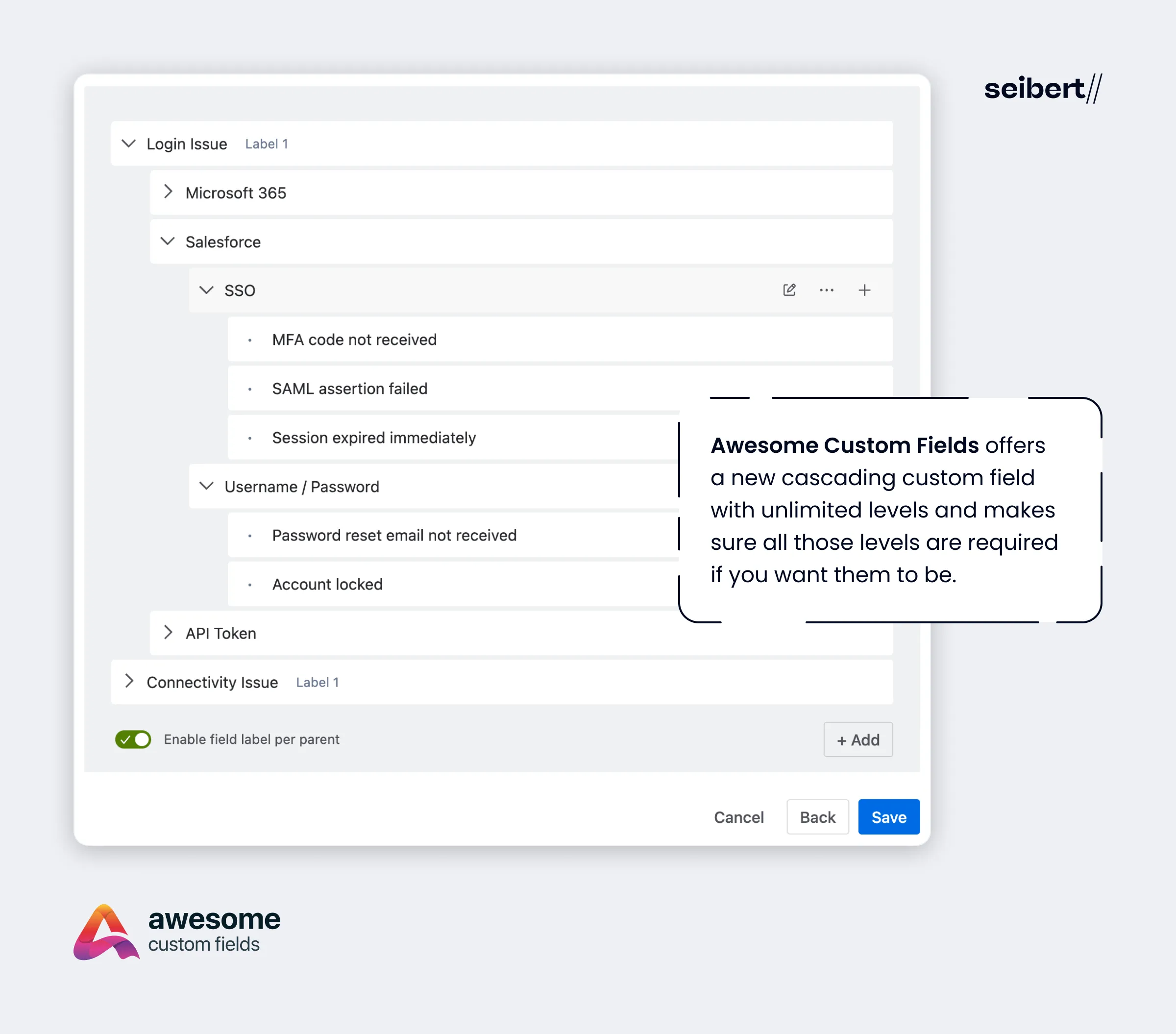
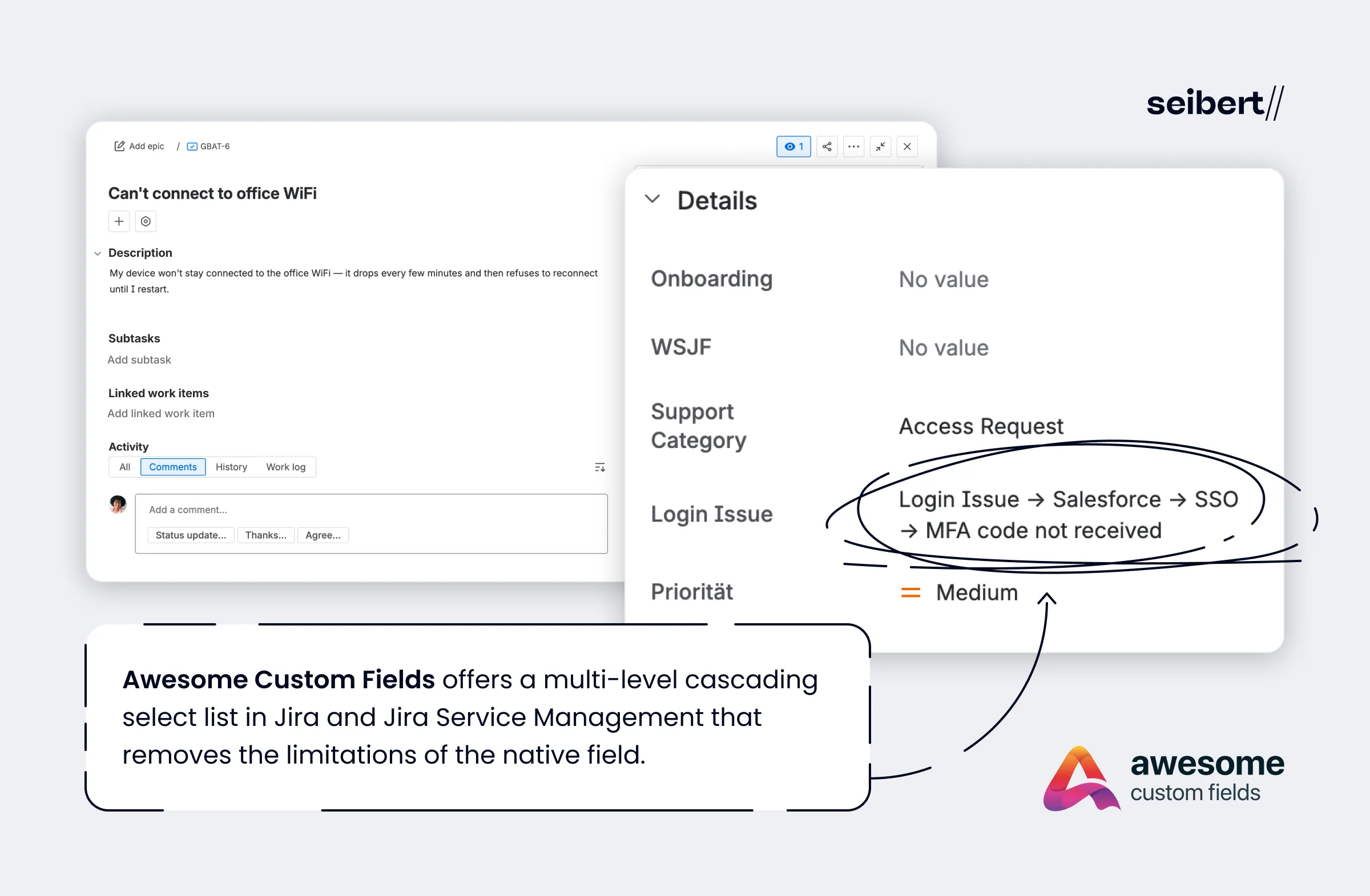
In this case, it would be useful for both user and agent to have a multi-level cascading select field, so that the problem can be routed to the correct person and isolated quickly. For example: Problem Type (Login Issue) → Application (Salesforce) → Authentication Method (SSO) → Specific Error (MFA code not received).
This kind of hierarchy allows the ticket to immediately convey what the problem is:
“The user can’t log in to Salesforce via single sign-on because multi-factor authentication codes are not coming through.”
This is much more actionable than simply Login Issue → Salesforce, since there could be any number of root causes of a login problem.
Incorrect categorization
Insufficient detail is one thing. But the two-level limit can actively push users into the wrong category too, because they’re forced to pick the closest available option, not the correct one.
For example, if a user can’t log in to Salesforce because of an MFA failure in Okta, selecting Login Issue → Salesforce would route the ticket to the Salesforce or app team. Actually, the problem belongs to the identity/SSO team. Similarly, the limit could lead users to blame a VPN connectivity problem on the network when it’s actually a problem with their device, e.g. a laptop certificate has expired.
Basically, with only two levels, all the root causes of a problem look the same to the user, so they guess what category it’s in and inevitably they guess wrong. Giving users more options in a multi-level cascading list helps reduce misclassification and misrouting.
Invalid combinations
If you replace your cascading select list with multiple separate fields, different things will go wrong.
If those fields are meant to represent a single hierarchy, then you’ll end up with inconsistent and invalid combinations of values because you’ve broken the relationship between them.
For example, you could have the following separate fields:
Field 1: Problem Type
Field 2: Device Type
Field 3: Operating System
A user could in theory choose WiFi connection problem → Mobile → Windows because the fields are independent. But Windows isn’t a mobile operating system; the user should have selected Android or iOS.
Basically, users have to guess which fields apply to their problem, when a multi-level cascading select list would remove that potential for error by enforcing the relationships between each level.
Why hasn’t Atlassian introduced a multi-level cascading select list?
Atlassian have always acknowledged that the Jira cascading select list only allows two levels. And they’ve pointed users to apps that support multi-level Jira cascading select lists on the Atlassian Marketplace instead.
That hasn’t stopped users from pushing for the feature to be built in. There’s an Atlassian support ticket requesting the addition of a 3+ level cascading custom field type, which has been “gathering interest” since, oh only 2005.
Unfortunately, Atlassian maintain that it’s not on the roadmap. We can only guess as to the reason. It’s probably that the field type was designed as a simple pair relationship of parent → child, not a recursive tree. Since Jira fields are heavily used in filtering, reporting, APIs, and automation, a fixed two-level structure is much easier to support everywhere. Expanding it beyond two levels would require a different data model, i.e. a general hierarchy, and a bunch of other changes.
Atlassian have tended to leave advanced or custom data modeling to Marketplace apps, and this is no exception.
Another problem with the native Jira cascading select field
You may have also encountered an annoying bug in the Jira cascading select list.
If you make the field required, users have to select a value in the parent field but can leave the child field with a value of “None”.
For years, Jira users have opined that if the cascading select field is required, both values should be selected. There are multiple support tickets asking for this to be fixed, including one dating back to 2006. (Anyone spotting a pattern here?)
Interestingly, there is a newer, related ticket where Atlassian have argued that making both fields required would impact customers who want partial selection. They say that some customers want only the parent value to be required and the child value left blank so it can be filled in later. They’ve actually used this argument to assess the ticket as a “feature request” instead of a “bug”.
Honestly, I’d love to know which customers are happy if the child value of a cascading select list is left blank. The whole point of this custom field is to have multiple options selected, otherwise, why wouldn’t you just use a single-select list? This smacks of Atlassian making excuses for not fixing a bug that has existed ever since the Jira cascading select list was born.
There is an Atlassian-suggested workaround that uses automation and smart values to make sure the child value is not empty. Also, on the original ticket, one user has outlined a workaround that uses ScriptRunner to block work item creation unless the child value is filled in. This actually led Atlassian to consider the issue resolved and close the ticket!
But Jira users want solutions, not workarounds.
What to do if you’re struggling with the native Jira cascading select list
It’s clear that Atlassian have no intention of fixing the problems with the native Jira cascading select list.
On the support ticket asking for a 3+ level cascading custom field type, they directed users to Marketplace apps instead, and recommended two apps: Multi Level & Tree Fields from Almbase, and Awesome Custom Fields from Seibert Products.
Almbase’s app is one of several on the Marketplace dedicated to solving the problem of the Jira cascading select list, by providing a new cascading field with unlimited depth.
But installing a whole app to solve one small problem that many users think is 100% Atlassian’s responsibility to fix is a bit hard to justify.
Awesome Custom Fields, on the other hand, is a different kettle of fish.
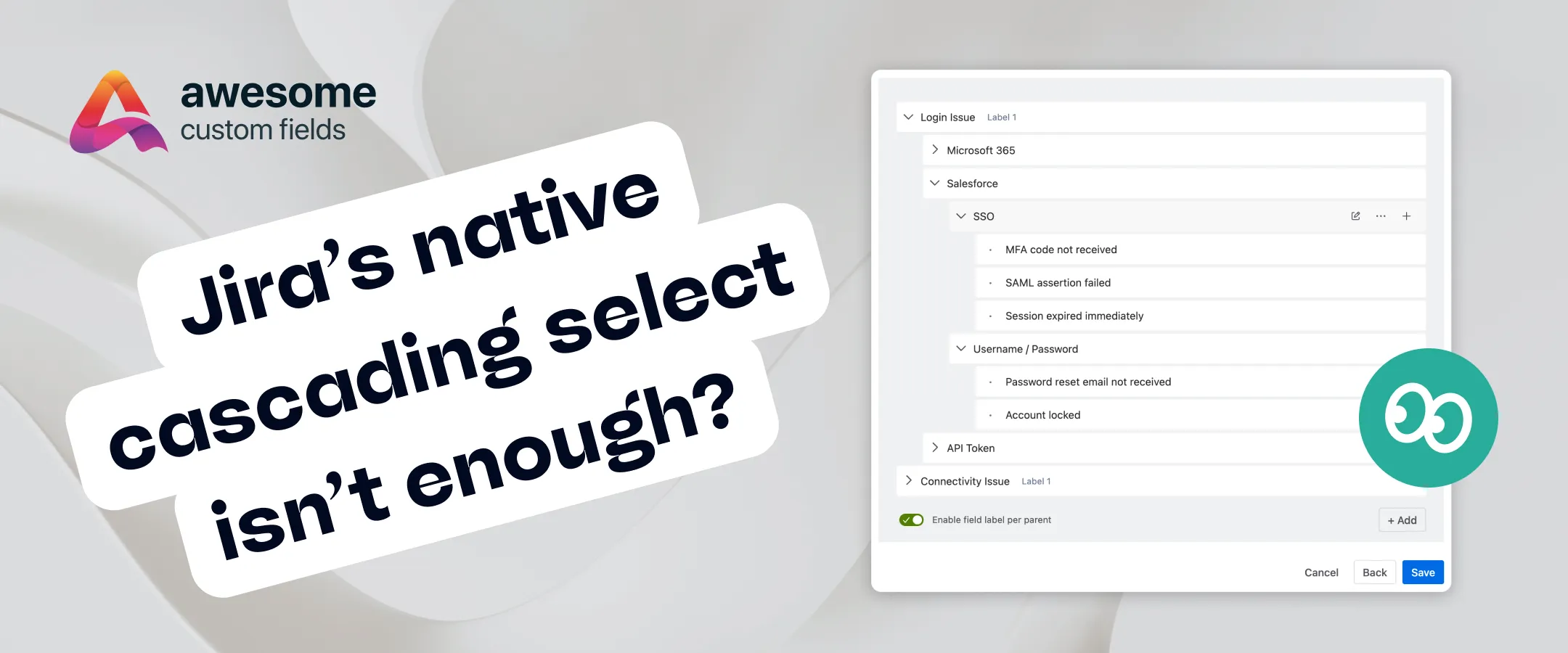
Yes, it offers a new cascading custom field with unlimited levels and makes sure all those levels are required if you want them to be.
But it also comes with a wide range of other new custom field types, like:
Advanced formula field for automatically calculating values based on other Jira fields
T-shirt sizes (with visual icons of T-shirts) for estimating tasks
MoSCoW field for prioritizing tasks with colored cards
Progress bar for visually representing work completion
Color labels for customizing label colors
These custom fields extend the capabilities of the standard Jira fields and make your work items more visually appealing and better at communicating key information. But they also add capabilities to your Jira project management by virtue of status, estimation, and prioritization fields that aren’t available natively.
So you might only need a multi-level cascading select list, but Awesome Custom Fields makes purchasing a Jira add-on — when you don’t really want to — feel like a much better deal.
How does the cascading select list work in Awesome Custom Fields for Jira?
Awesome Custom Fields offers a multi-level cascading select list in Jira and Jira Service Management that removes the limitations of the native field.
Specifically:
- Unlimited hierarchy depth: you can define as many levels as you need.
- If you make your cascading field a required field, users will have to select an option at each level; no level can be left blank.
You’ll be able to capture detailed information that reflects the complexity of your tasks and spaces. Your tickets become more actionable, more quickly, and you avoid the problem of tasks being misrouted or wrongly categorized.
Additional flexibility comes being able to disable individual options without deleting them. Users can see them but not select them, allowing you to safely evolve your hierarchical options over time without breaking anything.
And if you wish, you can automatically control your cascading select list options using an API. So if your fields have lots of options, or those options change often, you’re able to update everything in bulk using code, instead of clicking through hundreds of parent/child options and updating them manually. Our documentation has more on using the cascading select with an API.
To get set up, simply:
- Choose a name and description for your field.
- Add options for your dropdowns.
- Add names/labels to each dropdown level, e.g. Problem Type, Application, Authentication Method.
- Choose whether users can select multiple values per level.
- Choose whether the field is required.
- Choose how your field displays, i.e. the full hierarchical path or just the final selected option.
- Choose whether you only want selected users to see the values selected.
Our documentation has more detail on how to set up a cascading select list in Awesome Custom Fields. You can also have a preview of the field here:
Alternatively, watch our video tutorial:
The upshot
Jira’s built-in cascading select field is fine — for very simple cases. But it wasn’t designed for more complex hierarchies and trying to make it work by blending levels or creating multiple separate fields just doesn’t.
If your data has more depth, Awesome Custom Fields for Jira offers an easy way to model that depth properly (and without the annoying issue of required fields being left blank).
Try Awesome Custom Fields for Jira, and its flexible cascading select list, free for 30 days.